


The Government of India has launched an online appointment system for Aadhaar cards. A user simply needs to visit the UIDAI’s official website to book an online appointment for an Aadhaar card update. While details such as name, gender, date of birth, language, and address can be updated online, a visit to an official Aadhaar Enrolment Centre is still required to update biometric details, mobile number, and other information.
In this blog, we will walk you through the process of scheduling an Aadhaar card online appointment to update your Aadhaar card details.
How to Schedule an Aadhaar Card Appointment?
Here are the steps to schedule an Aadhaar card online appointment:
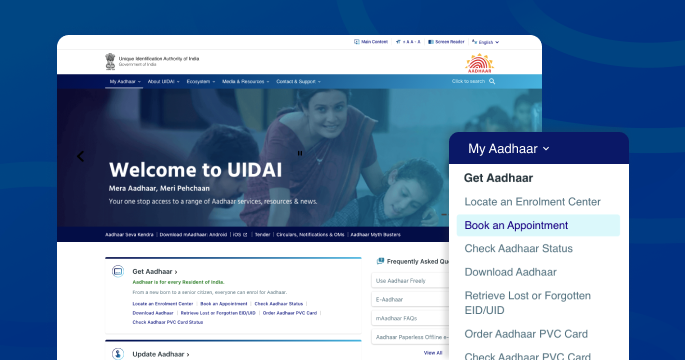
- Visit the official website of UIDAI
- Locate ‘My Aadhaar’, click on ‘Book an Appointment’
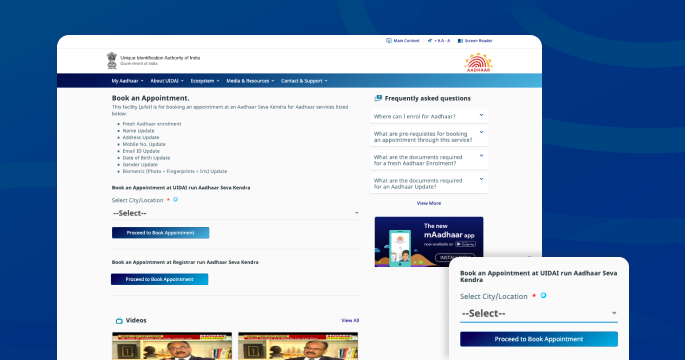
- Book an appointment at either a UIDAI-run Aadhaar Seva Kendra or a Registrar-run Aadhaar Seva Kendra
- Select your location
- Click on ‘Book appointment’ or ‘Manage appointment’
- Enter mobile number, captcha code and click on ‘Get OTP’
- Submit your OTP
- Add your Aadhaar details and other required information
- Select your preferred date and time
- You will then receive your appointment number
After receiving your appointment number, visit the official Aadhaar enrolment centre to have your Aadhaar-related information updated. Additionally, it is mandatory to link your mobile number to your Aadhaar card to receive an OTP for authentication.
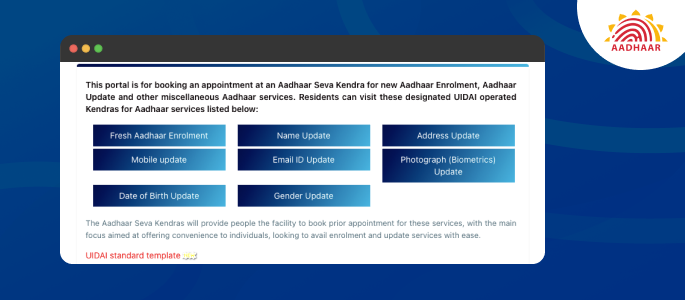
Currently, the Aadhaar Sewa Kendra offers the following services:
- Fresh Aadhaar enrolment
- Name update
- Address update
- Mobile update
- Email ID update
- Photograph (biometric) update
- Gender change
- Date of birth update
Author

