

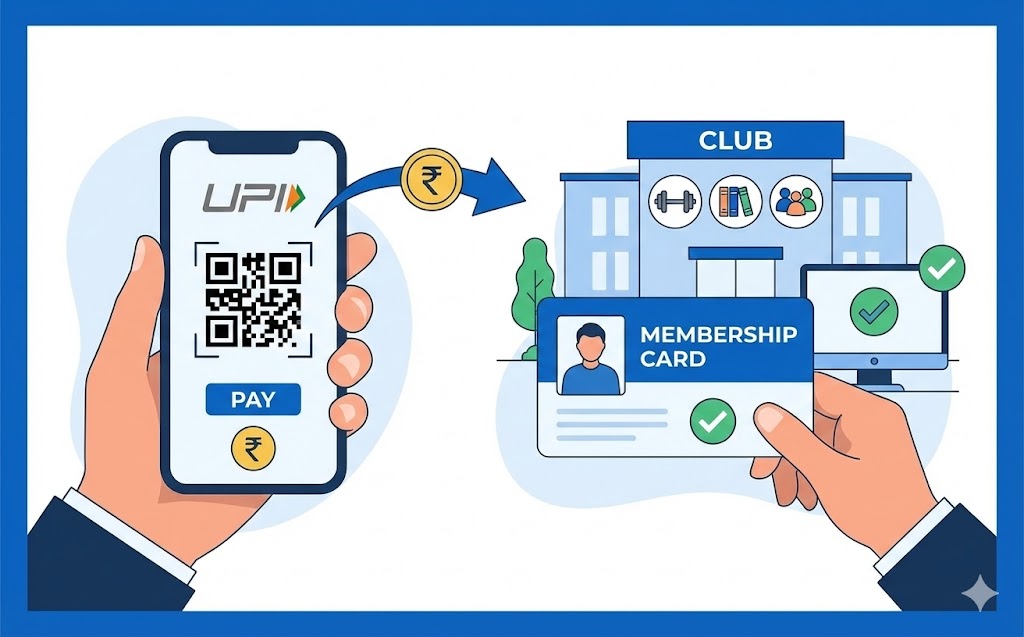
Paying membership fees with a UPI ID offers a simple, secure, and efficient digital solution. This guide explains how this unique identifier, linked to your bank account, facilitates instant transactions. Learn to prepare, follow a step-by-step payment process using your digital payments application and secure PIN, and ensure safety. Embrace this convenient method for hassle-free fee management, always double-checking details and protecting your PIN.
Managing your membership fees should be a straightforward and secure process. In today’s digital world, using your unique IDentifier for payments, often called a UPI ID, offers a wonderfully simple way to handle these regular payments. This guide will walk you through everything you need to know, ensuring you can pay your fees with confidence and ease.
Understanding Your UPI ID
Before we dive into making payments, let’s ensure we are all clear on what a UPI ID is and why it’s such a beneficial tool for your financial transactions.What Exactly is a UPI ID?
Imagine having a special address that allows you to send and receive money directly from your bank account, without needing to share your full bank account number or other sensitive details. That’s essentially what a UPI ID is! It stands for Unified Payments Interface ID, and it’s a unique identifier, much like an email address, but specifically for money transfers. This ID is linked directly to your bank account, making transactions swift and secure. It’s a system designed by the National Payments Corporation of India (NPCI) to simplify digital payments.Why Using UPI for Fees is a Smart Choice
Choosing to pay your membership fees using a UPI ID comes with several compelling advantages. Firstly, it is incredibly fast; payments are often processed instantly, meaning your membership is updated without delay. Secondly, it’s highly secure. You don’t need to share sensitive bank details with the organisation you are paying, only their UPI ID. Thirdly, it’s remarkably convenient. You can make payments at any time of day or night, from anywhere, using your digital payments application on your mobile phone. This flexibility means you can always keep your membership up to date without hassle.Getting Ready to Make Your Payment
Preparation is key to a smooth transaction. Let’s gather everything you will need and ensure your details are correct before you begin.What You Will Need Before You Start
To ensure your payment goes through without a hitch, please have the following ready:- A digital payments application: This could be an app provided by your bank or another trusted payment service provider, installed on your smartphone.
- Your bank account linked: Ensure your bank account is properly connected to your digital payments application.
- Your secure PIN: This is a secret number you use to authorise transactions, similar to a debit card PIN.
- The membership organisation’s UPI ID: This is the unique ID provided by the organisation you are paying.
- An active internet connection: You will need this for your phone to communicate with the payment system.
Finding Your Own UPI ID
While you will be using the membership’s UPI ID to send money, it’s helpful to know where to find your own. Typically, your UPI ID is displayed prominently within your digital payments application, often in your profile section or under settings. It usually looks something like ‘yourname@bankname’ or ‘yournumber@provider’. Familiarising yourself with your own ID can be useful for future transactions where you might need to receive money.Double-Checking Your Membership Details
Before making any payment, it is crucial to confirm the exact amount due for your membership fees. Also, ensure you have the correct UPI ID for the membership organisation. Sometimes, organisations might have different UPI IDs for various types of payments. Always refer to the official communication from your membership provider for the correct details to avoid any mistakes.A Step-by-Step Guide to Paying
Now, let’s go through the process of making your payment step-by-step. It’s a simple journey once you know the way.Opening Your Digital Payments Application
First, unlock your smartphone and open the digital payments application you normally use. You might need to enter your app’s password or use your fingerprint/face recognition to access it securely.Choosing to Send Money Using a UPI ID
Once inside the app, look for options like “Send Money,” “Pay,” or “Transfer.” Within these options, you should find a choice to send money using a UPI ID. Select this option to proceed.Entering the Membership’s UPI ID
Carefully type the UPI ID provided by your membership organisation into the designated field. It is incredibly important to enter this correctly. Many apps will show the recipient’s name once you enter their UPI ID, allowing you to double-check that you are paying the correct organisation.Putting in the Correct Amount
Next, enter the precise amount of your membership fee. Please double-check this figure against your membership invoice or statement to ensure accuracy. Even a small mistake here could cause issues.Confirming Your Payment with Your Secure PIN
After entering the amount, your application will typically show you a of the transaction. Review this carefully. If everything looks correct, you will then be prompted to enter your secure PIN. This PIN is your final authorisation, confirming that you approve the payment. Enter it carefully and discreetly.What Happens After You Pay?
Once you enter your PIN, the payment will usually be processed instantly. You should receive a confirmation message within your digital payments application, often accompanied by an SMS notification from your bank or the app itself. This message will confirm that your payment was successful. It’s always a good idea to keep a record of this confirmation, perhaps by taking a screenshot or noting down the transaction ID, just for your peace of mind.Keeping Your Payments Safe and Sound
While using a UPI ID is very secure, it’s always wise to follow some best practices to protect your money and personal information.Always Confirm Who You Are Paying
Before you finalise any payment, always confirm the name of the recipient that appears on your screen after you enter the UPI ID. If the name doesn’t match what you expect, or if it looks suspicious, do not proceed with the payment. Contact the membership organisation directly to verify their official UPI ID.Protecting Your Personal Identification Number (PIN)
Your secure PIN is the key to your digital payments. Never share it with anyone, not even family members or bank officials. Your bank will never ask for your PIN. Avoid writing it down, and consider changing it regularly to maintain security. Treat it with the same care as you would your ATM card PIN.What to Do if Something Goes Wrong
In the unlikely event that a payment fails, or if you suspect a fraudulent transaction, act quickly. First, check your transaction history within your digital payments application. If you see an incorrect or unauthorised transaction, immediately contact your bank’s customer service helpline. They can guide you on the next steps, which may include blocking your account or raising a dispute. You should also inform the membership organisation if the payment was for your fees and did not go through as expected.Wrapping Up Your Payment Journey
Using a UPI ID for your membership fees is truly a modern convenience that simplifies financial tasks.The Simplicity of Using UPI for Your Fees
As you have seen, paying your membership fees with a UPI ID is a straightforward, secure, and efficient process. It eliminates the need for complex bank details, offers instant confirmation, and gives you the flexibility to manage your payments at your convenience. By following these simple steps and keeping security in mind, you can confidently embrace this digital payment method for all your membership needs.Author

FAQs
What exactly is a UPI ID?
It's a unique address that lets you send and receive money directly from your bank account. You don't need to share your full bank details, making transactions quick and safe.
Why should I use a UPI ID to pay my membership fees?
It's very fast, secure because you don't share sensitive bank details, and convenient as you can pay anytime, anywhere using your mobile phone app.
What do I need before I pay my fees using a UPI ID?
You will need a digital payments app on your smartphone, your bank account linked to it, your secure PIN, the membership organisation's UPI ID, and an active internet connection.
How do I find my own UPI ID?
Your UPI ID is usually shown within your digital payments app, often in your profile section or under settings. It typically looks like 'yourname@bankname' or 'yournumber@provider'.
What should I check before making a payment?
It's important to confirm the exact amount you owe for your membership fees. Also, make sure you have the correct UPI ID for the organisation you are paying, checking their official messages.
How do I pay my membership fees using a UPI ID?
Open your digital payments app, choose to send money using a UPI ID, type in the organisation's UPI ID, enter the correct amount, review the details, and then enter your secure PIN to confirm the payment.
What happens after I make a payment?
The payment is usually processed instantly. You should get a confirmation message in your digital payments app, and often an SMS from your bank or the app. It's a good idea to keep a record of this.
How can I make sure I am paying the correct organisation?
After you enter the UPI ID, your app will often show the recipient's name. Always check this name carefully. If it doesn't match what you expect, do not continue and contact the organisation directly.
What should I do if a payment fails or seems wrong?
First, check your transaction history in your digital payments app. If you see an incorrect payment, contact your bank's customer service helpline immediately. You should also tell the membership organisation.
