


The official website of UIDAI provides a variety of Aadhaar card services online. These services simplify tasks for users, such as verifying their Aadhaar card details, email/mobile number, and locking/unlocking biometrics.
This blog will explain the various Aadhaar card services provided by UIDAI online, as well as how to use them effectively.
Aadhaar Card Services on the UIDAI Website
The official website of UIDAI offers the following Aadhaar card services:
- Verify an Aadhaar number
- Verify Email/mobile number
- Retrieve Lost or Forgotten EID/UID
- Virtual ID (VID) Generator
- Aadhaar Paperless Offline e-KYC
- Check Aadhaar/Bank Linking Status
- Lock/Unlock Biometrics
- Aadhaar Authentication History
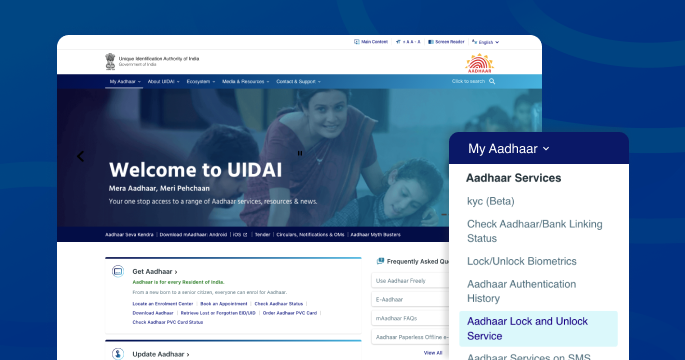
- Aadhaar Lock and Unlock Service
- Aadhaar Services on SMS
How to Verify an Aadhaar Number through the UIDAI Website?
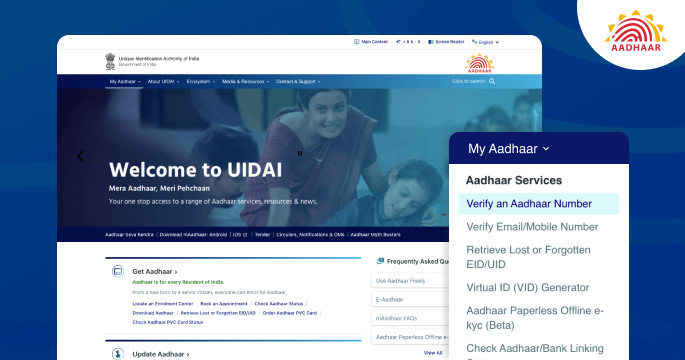
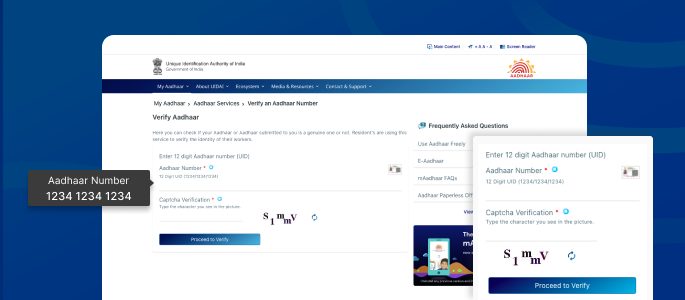
A key Aadhaar card service provided by UIDAI is the verification of an Aadhaar number. Here are the steps:
- Visit the official website of UIDAI
- Navigate to ‘My Aadhaar’, click on ‘Verify an Aadhaar Number’ under the ‘Aadhaar Services’
- Enter 12-digit Aadhaar number and captcha code
- Click on ‘Proceed to Verify’ to verify your Aadhaar number
How to Verify an Email/Mobile Number through the UIDAI Website?
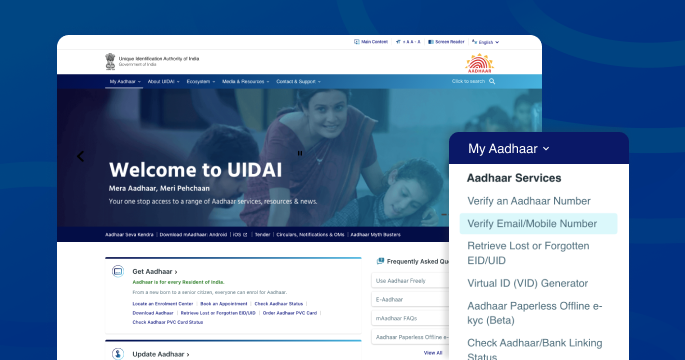
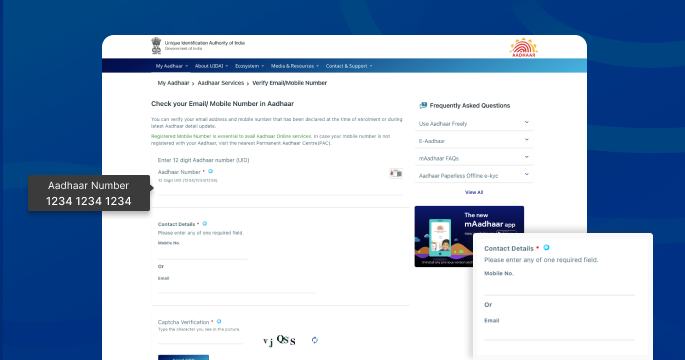
A user can verify an email or mobile number via the UIDAI website by following the steps outlined below:
- Visit the UIDAI official website
- Click on ‘My Aadhaar’, locate ‘Aadhaar Services’ and click on ‘Verify Email/Mobile Number’
- Next, enter a 12-digit Aadhaar number and your email/mobile number
- Enter captcha code and click on ‘Send OTP’
- Enter the OTP to verify the email/mobile number
How to Retrieve Lost or Forgotten EID/UID?
The user must follow the steps below to retrieve a lost or forgotten EID/UID:
- Visit UIDAI website
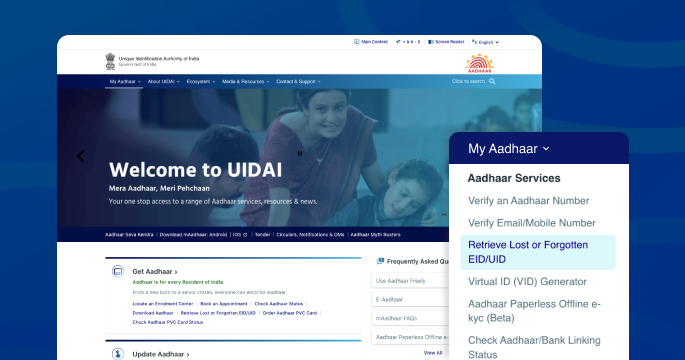
- Click on ‘My Aadhaar’, navigate to ‘Aadhaar Services’ and click on ‘Retrieve Lost or Forgotten EID/UID’
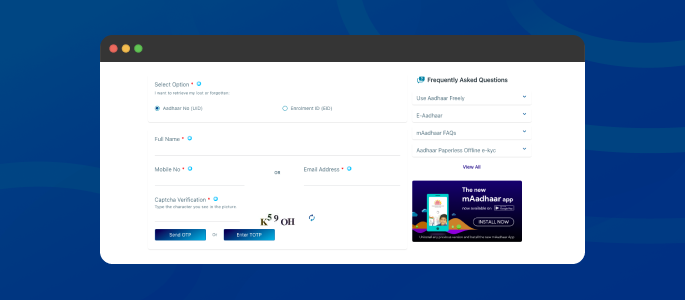
- Upon clicking, a new page will appear with the Aadhaar number and Enrolment ID options
- Select either the Aadhaar number or Enrolment ID option, fill in your personal information, and enter the captcha code
- Click on ‘Send OTP’, enter the OTP to retrieve lost or forgotten EID/UID
How to Generate Virtual ID through the UIDAI Website?
An Aadhaar Virtual ID can be used in place of an Aadhaar number. It is a revocable, temporary 16-digit random number generated against an Aadhaar number. The steps for creating an online Virtual ID are as follows:
- Visit UIDAI website
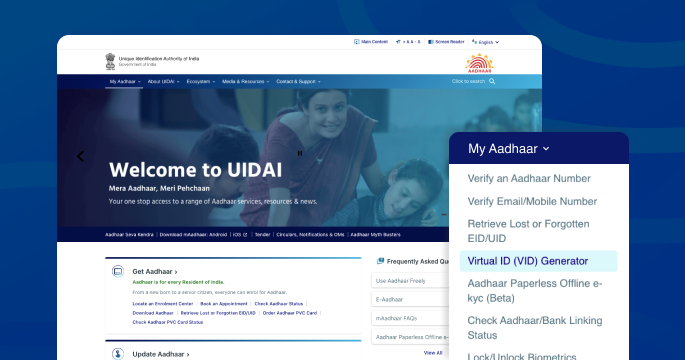
- Click on ‘My Aadhaar’, locate ‘Aadhaar Services’ and click on ‘Virtual ID (VID) Generator’
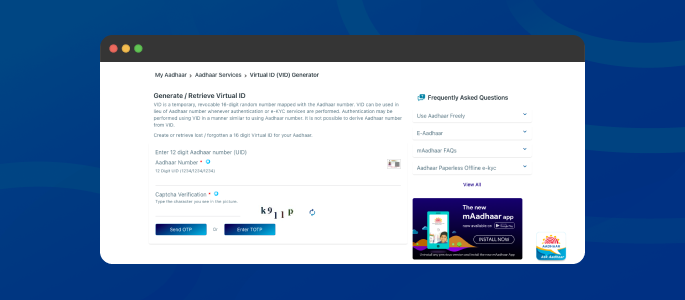
- Enter a 12-digit Aadhaar number, captcha code and click on ‘Send OTP’
- Submit the OTP, then click on ‘Generate VID’ or ‘Retrieve VID’, and finally click ‘Submit’
- Virtual ID will be generated and sent to the registered mobile number
How to do Aadhaar Paperless Offline KYC through the UIDAI Website?
Another valuable Aadhaar card service provided by UIDAI is paperless offline Aadhaar KYC. Applicants simply need to follow these instructions:
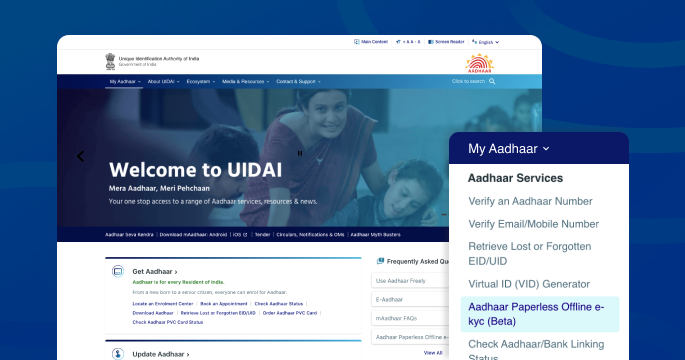
- Visit the official website of UIDAI
- Navigate to ‘Aadhaar Services’ and click on ‘Aadhaar Paperless Offline e-KYC’
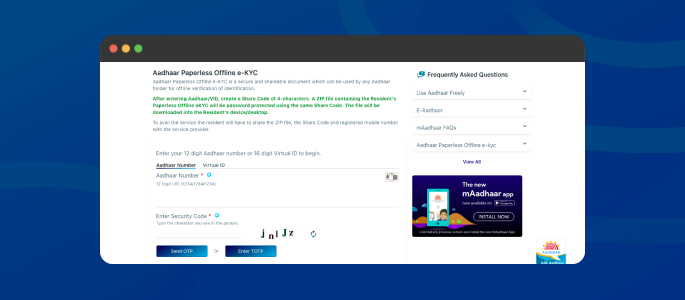
- Enter your 12-digit Aadhaar number, security code and click on ‘Send OTP’
- Submit the OTP to receive a ZIP file containing the applicant’s paperless offline e-KYC
Things to be noted:
- Aadhaar paperless offline e-KYC is a shareable document. It can be shared with the concerned authorities for offline verification.
- The password-protected ZIP file contains the applicant’s paperless offline e-KYC, and a share code must be entered to open it.
How to Check an Aadhaar/Bank Linking Status on the UIDAI Website?
Another Aadhaar card service available on the UIDAI website is the ability to check the status of Aadhaar/bank linking. One can check the status by following the simple steps outlined below:
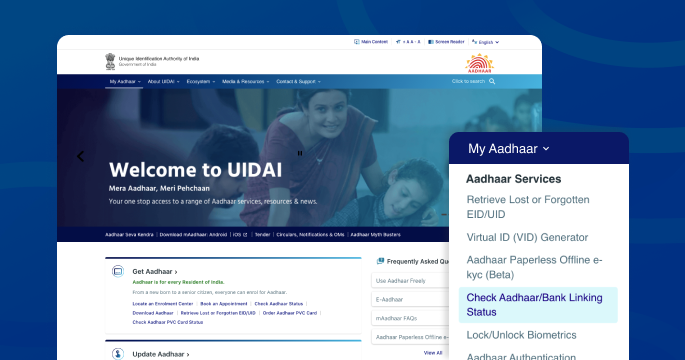
- Visit the official website of UIDAI
- Click on ‘Aadhaar/Bank Linking Status’ under the section ‘Aadhaar Services’
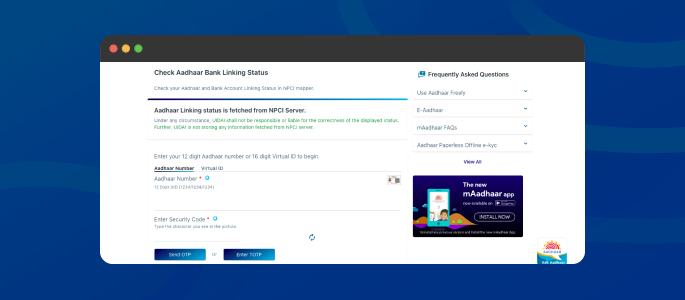
- Enter 12-digit Aadhaar number and security code
- Then, enter the OTP to check the Aadhaar/bank linking status
How to Lock/Unlock Aadhaar Biometrics Online?
UIDAI has added a feature on its official website to lock/unlock Aadhaar biometrics to prevent misuse of an Aadhaar card. An applicant can lock/unlock biometrics by following these instructions:
Lock Aadhaar Biometrics
An applicant should follow the instructions below to lock their Aadhaar biometrics.
- Visit UIDAI official website
- Click on ‘My Aadhaar’, locate ‘Aadhaar Services’ and click on ‘Lock/Unlock Biometrics’
- Tick the declaration and click on ‘Lock/Unlock Biometrics’
- Enter 12-digit Aadhaar number and captcha code
- Enter the OTP, and then activate the locking feature
- Aadhaar biometrics will be locked
Unlock Aadhaar Biometrics
An applicant must complete the following steps to unlock Aadhaar biometrics:
- Visit UIDAI website
- Click on ‘My Aadhaar’, and select ‘Lock/Unlock Biometrics’
- Tick the declaration and click on ‘Lock/Unlock Biometrics’
- Enter Aadhaar number and captcha code
- Click on ‘Get OTP’, enter the OTP to unlock biometrics
- Aadhaar biometrics will be unlocked
How to Lock/Unlock Aadhaar Services Online?
Lock/unlock Aadhaar service differs slightly from the Aadhaar biometric lock/unlock feature. Although users cannot use their Aadhaar number to authenticate information in either situation, they can use their VID to do so. Here’s how to lock/unlock your Aadhaar service online:
- Visit UIDAI website
- Navigate to ‘Aadhaar Services’ and click on ‘Aadhaar lock/unlock Service’
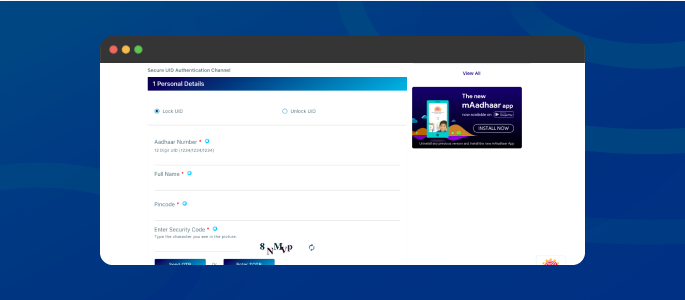
- Upon clicking, a new screen will appear with a note. Read it carefully before proceeding further
- Click on the ‘Lock UID’ or ‘Unlock UID’ option, then enter your 12-digit Aadhaar number, name, PIN Code, and captcha code
- Enter the OTP to lock or unlock Aadhaar services
How to avail Aadhaar Services via SMS?
The UIDAI has introduced a new feature and service called ‘Aadhaar services on SMS.’ The service is best suited for those who do not have access to the internet, resident portal, m-Aadhaar, or other Aadhaar-related services. The following SMS commands can be used to obtain Aadhaar services:
| Purpose | SMS Command |
| To generate Virtual ID | GVID<SPACE>Aadhaar-Number-last-4-digits |
| To Retrieve Virtual ID | RVID<SPACE>Aadhaar-Number-last-4-digits |
| To get OTP | When using Aadhaar Number: GETOTP<SPACE>Aadhaar-Number-last-4-digits When using Virtual ID: GETOTP<SPACE>Virtual-ID-last-6-digits |
| To Lock Aadhaar | An applicant needs to send 2 SMS: SMS 1- GETOTP<SPACE>Aadhaar-Number-last-4-digitsSMS 2- LOCKUID<SPACE>Aadhaar-Number-last-4-digits<SPACE>OTP-6-digits |
| To Unlock Aadhaar | An applicant needs to send 2 SMS: SMS 1- GETOTP<SPACE>Virtual-ID-last-6-digitsSMS 2- UNLOCKUID<SPACE>Virtual-ID-last-6-digits<SPACE>OTP-6-digits |
| To Enable Biometric Lock | An applicant needs to send 2 SMS: SMS 1- GETOTP<SPACE>Aadhaar-Number-last-4-digitsSMS 2- ENABLEBIOLOCK<SPACE>Aadhaar-Number-last-4-digits<SPACE>OTP-6-digits |
| To Disable Biometric Lock | An applicant needs to send 2 SMS: SMS 1- GETOTP<SPACE>Aadhaar-Number-last-4-digitsSMS 2- DISABLEBIOLOCK<SPACE>Aadhaar-Number-last-4-digits<SPACE>OTP-6-digits |
| To Temporarily Unlock Biometrics | An applicant needs to send 2 SMS: SMS 1- GETOTP<SPACE>Aadhaar-Number-last-4-digitsSMS 2- UNLOCKBIO<SPACE>Aadhaar-Number-last-4-digits<SPACE>OTP-6-digits |
Author

