


The Indian government has made it simple for users to apply for an Aadhaar card digitally and to lodge online complaints against it.
This blog will walk you through the process of lodging a complaint against Aadhaar.
How to Lodge a Complaint Against Aadhaar Online?
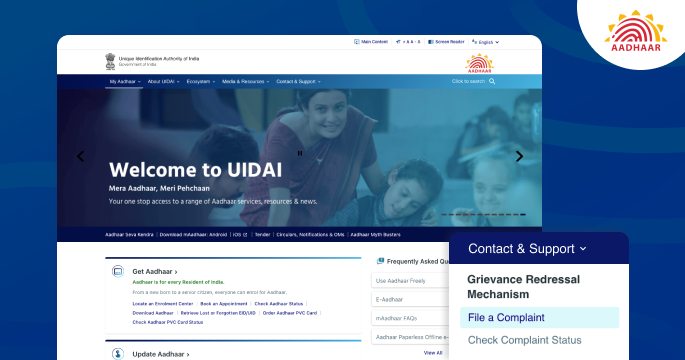
A user can lodge a complaint against Aadhaar by following these steps:
- Visit the official website of UIDAI
- Navigate to ‘Contact & Support’ and click on ‘File a complaint’
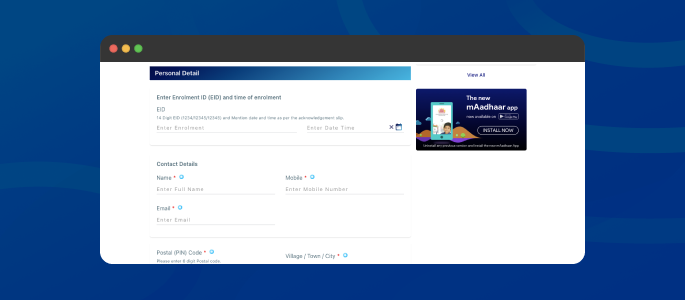
- Enter 14-digit Enrollment ID, name, mobile number, email address, PIN, postal address
- Select type of complaint and category
- Write your concern and enter the captcha code
- Click on ‘Submit’
How to Lodge a Complaint Against Aadhaar through the Contact Centre?
Another option for lodging a complaint against Aadhaar is to contact the Aadhaar Contact Centre. The steps to do the same are as follows:
- Visit the official Aadhaar enrollment centre
- Collect the acknowledgement slip that contains the enrollment ID
- To lodge a complaint against Aadhaar, contact the UIDAI contact centre by dialling the toll-free number 1947
How to Lodge a Complaint Against Aadhaar through Email?
UIDAI has introduced an email address to resolve user issues, complaints, and grievances against Aadhaar. The official email address is [email protected].
When a complaint is received, it is forwarded to the concerned Regional Office or Section at Headquarters. The concerned Regional Office or Section then responds to the email, providing an update from the grievance cell.
How to Lodge a Complaint Against Aadhaar through Post?
A hard copy or postal mail can be used to lodge a complaint against Aadhaar. Complaints are received directly by UIDAI Headquarters and Regional Offices and are then investigated. After approval by the Deputy Director, complaints are forwarded to the concerned Regional Offices or Sections at Headquarters. The concerned Regional Offices or Sections then respond to the complaint, providing an update from the grievance cell.
Also Read: Aadhaar Card Download
- Operator & Enrollment Agencies (Enrollment ID is optional)
- Aadhaar not Generated (Enrollment ID is mandatory)
Author

