


Paytm is your one-stop solution for all your daily payment needs. Whether you need to pay bills, recharge your phone, make online payments, or pay merchants at their shops, Paytm has you covered. You can easily make UPI payments by scanning QR codes or entering mobile numbers. And that’s not all – with Paytm transactions, you have the opportunity to win cashback and enjoy other amazing deals.
But wait, there’s more! Paytm is not just an everyday app, it’s also the top UPI money transfer app in India. It has received high ratings from users and gained their trust.
Let’s explore more about Paytm and discover why it is considered one of the best UPI apps in India!
Why Paytm is the Best UPI App in India?
Paytm stands out as the best UPI money transfer app for several reasons. Firstly, it offers a comprehensive range of services, allowing users to fulfill all their payment needs in one place. Whether it’s bill payment, phone recharge, online transactions, or merchant payments, Paytm has it covered.
Additionally, Paytm makes UPI payments incredibly convenient. Users can easily make payments by scanning QR codes or entering mobile numbers, ensuring a seamless and hassle-free experience. This simplicity is a key factor in making Paytm the preferred choice for many users.
Furthermore, Paytm offers attractive rewards such as cashback and exclusive deals with transactions, enhancing the overall value for users. These incentives make using Paytm even more rewarding and beneficial.
Another reason why Paytm is highly regarded is its strong reputation and trustworthiness. It has received high ratings from users and has built a solid foundation of trust over the years.
Overall, Paytm’s wide range of services, convenience, rewards, and trustworthiness collectively contribute to its status as the best UPI money transfer app in India.
How is Paytm different From Other UPI Apps?
- Extensive Merchant Network: Paytm has built a vast network of merchants, both online and offline, allowing users to make seamless payments at a wide range of establishments. This extensive merchant network sets Paytm apart from other UPI apps, providing users with more options and convenience when it comes to making payments.
- Strong Brand Presence: Paytm has established itself as one of the most recognizable and trusted brands in the Indian digital payments space. Its strong brand presence gives users confidence in the security, reliability, and customer support offered by Paytm, setting it apart from other UPI apps.
- Customer Support: Paytm provides robust customer support services, including 24/7 helpline assistance and an extensive FAQ section. Users can easily reach out for support and have their queries or issues addressed promptly, enhancing the overall user experience.
- Integration with Paytm Ecosystem: Paytm has developed an extensive ecosystem of services and partnerships, including tie-ups with various online platforms, e-commerce websites, and service providers. This integration allows users to access a wide range of services and benefits within the Paytm app, making it a more comprehensive and platform for all needs.
How to Make a UPI Transaction on Paytm?
Step 1: Open the Paytm app on your smartphone.
Step 2: Choose “Scan and Pay” or use the QR code scanner feature on the main screen. (refer to the given image)
Step 3: Enter the mobile number or name of the receiver. You can select the contact from your phone book or manually enter the number.
Step 4: On the next screen, click on “Pay” and enter the amount you wish to send.
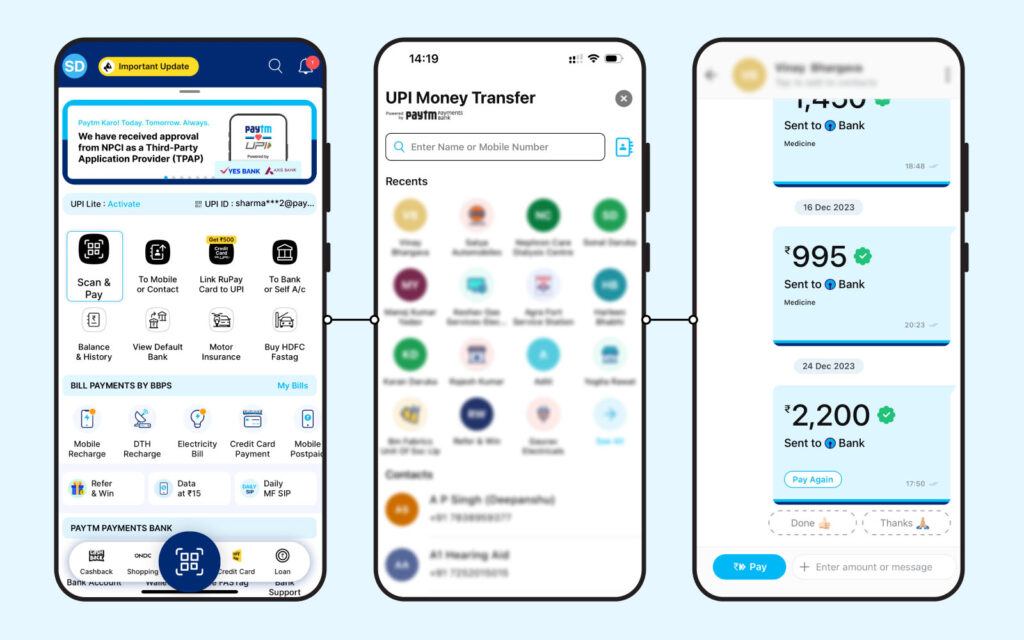
Step 5: Select the preferred mode of payment and proceed. Add a remark or description (optional) to specify the purpose of the transaction.
Step 6: Finally, click on “Pay” to complete the transaction and send money to the receiver.
Note: These steps illustrate the Paytm UPI payment process. While other UPI payment methods are similar, the steps may vary slightly depending on the platform you are using.
In conclusion, Paytm stands out from other UPI apps in India due to its diverse range of services, extensive merchant network, additional features and services, strong brand presence, robust customer support, and integration with the Paytm ecosystem. With its user-friendly interface, attractive cashback rewards, and established reputation, Paytm offers users a convenient and comprehensive financial platform that sets it apart as a preferred choice for UPI transactions and a range of other financial needs.
Disclaimer: This blog aims to simplify processes for readers. However, it is important to note that some information and screenshots may be outdated as Paytm may change its user interface for improved usability. Readers are advised to cross-check the latest information on Paytm app for the most accurate and up-to-date instruction

