

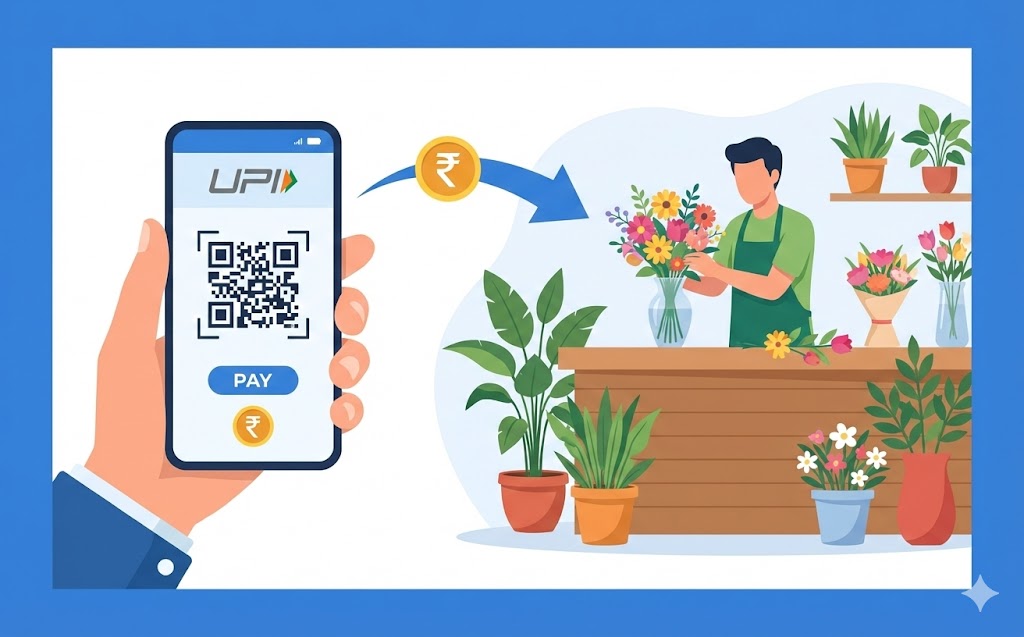
Learn to use your digital payment ID for buying flowers easily. This guide explains what your unique ID is and its benefits: quick, secure payments without needing cash or cards. Discover how to set up your digital payment application, link your bank, and follow a simple step-by-step process to pay florists. Ensure a smooth experience by confirming details and keeping your app updated.
Imagine being able to buy a beautiful bouquet of flowers for a special occasion, or simply to brighten someone’s day, without needing to carry cash or even a bank card. With a UPI ID, this convenience is now a reality. This guide will help you understand how to use your unique digital payment identifier to make buying flowers a simple and secure experience.
Understanding Your UPI ID
Before you can start buying lovely flowers, it’s helpful to understand what a UPI ID actually is and how it works.What Exactly Is a UPI ID?
Think of your UPI ID as your very own special address for sending and receiving money digitally. It’s a unique identifier, much like an email address, but specifically designed for financial transactions. This ID is linked directly to your bank account and is provided to you by your chosen digital payment application. It allows you to make payments quickly and easily, without having to share your sensitive bank account number or other personal details every time.How Your UPI ID Makes Paying Simple
The beauty of a UPI ID lies in its simplicity. Instead of remembering long bank account numbers, IFSC codes, or card details, you only need to know the recipient’s UPI ID (or scan their QR code). This makes payments incredibly straightforward. Whether you’re paying a florist, a shop, or a friend, your UPI ID ensures that money moves swiftly and with minimal fuss, making your daily transactions much smoother.Why Choose UPI When Buying Flowers?
When you’re standing in a florist shop, surrounded by vibrant colours and sweet scents, using a UPI ID offers several compelling advantages.Quick and Easy Payments
One of the biggest benefits of using a UPI ID is how incredibly fast it is. Once you’ve entered the details and confirmed the payment, the transaction usually happens in a matter of seconds. This means no more waiting for change, no fumbling with cards, and no delays. You can pick your flowers, pay instantly, and be on your way, making your shopping experience much more efficient.Keeping Your Money Safe and Secure
Security is paramount when it comes to your money, and using a UPI ID is designed with this in mind. Each transaction is protected by your personal secure PIN, which only you know. Your bank account details remain private, as you only share your UPI ID, not your full bank information. This system helps keep your money safe from unauthorised access, giving you peace of mind with every payment. The underlying technology is robust, ensuring that your financial details are encrypted and protected.No Need for Cash or Cards
Imagine you’ve just spotted the perfect bunch of roses, but you realise you’ve left your wallet at home. If you have your phone and a UPI ID, this is no longer a problem! You don’t need to carry physical cash or even your bank cards. Your phone becomes your payment tool, allowing you to make purchases wherever UPI is accepted. It’s incredibly convenient, especially when you’re out and about and want to make an unplanned purchase.Getting Ready to Pay with UPI
Before you can enjoy the ease of paying for flowers with your UPI ID, there are a couple of simple steps to get set up.Setting Up Your Digital Payment Application
First, you’ll need to have a digital payment application installed on your smartphone. Many banks offer their own applications, and there are also other trusted applications available. You can download these applications safely from your phone’s official app store. Once installed, you’ll go through a quick registration process, which usually involves verifying your mobile number.Connecting Your Bank Account Safely
After setting up your application, the next crucial step is to link your bank account to it. This process is designed to be very secure. Typically, the application will detect your bank account based on the mobile number linked to it. You will then create a secure PIN, often called a UPI PIN, which you will use to authorise all your payments. This PIN is like a secret password for your transactions, ensuring only you can approve payments from your account.Paying for Your Beautiful Flowers Using a UPI ID
Now that you’re all set up, let’s look at how you can actually pay for those lovely flowers.Finding the Florist’s UPI ID
Most florists who accept UPI payments will display their UPI ID clearly. You might see it printed on a sign at the counter, on their website, or they might tell it to you verbally. Often, they will also have a QR code that you can simply scan with your phone’s camera, which automatically fills in their UPI ID for you.Step-by-Step Guide to Sending Money
Sending money using your UPI ID is a straightforward process:- Open your digital payment application: Launch the application on your smartphone.
- Select the ‘Send Money‘ or ‘Pay’ option: Look for a button or icon that allows you to initiate a payment.
- Enter the florist’s UPI ID or scan their QR code: Carefully type in the florist’s UPI ID, or use the app’s scanner to read their QR code.
- Enter the exact amount: Input the total cost of your flowers. Double-check this figure to ensure it’s correct.
- Add a note (optional): You can add a short message, like “for flowers” or “flower purchase,” which can be helpful for your records.
- Review the details: Before confirming, always take a moment to check the recipient’s name (which usually appears after you enter the UPI ID) and the amount.
- Enter your secure PIN: Input your confidential UPI PIN to authorise the transaction.
- Payment complete: Once your PIN is entered, the payment will be processed almost instantly.
What Happens After You Send the Money?
After successfully sending the money, you will usually receive an instant confirmation message on your digital payment application, and often an SMS from your bank. The florist will also receive a notification or see the payment reflected in their system, confirming that they have received your payment. This quick confirmation ensures a smooth and transparent transaction for both you and the florist.What to Do If You Need a Little Help
Even with the best systems, sometimes you might encounter a small issue or have a question. Knowing what to do can make all the difference.Checking Your Past Transactions
If you’re unsure whether a payment went through, or if you simply want to review your spending, you can easily check your transaction history within your digital payment application. This feature provides a detailed record of all your past payments, including the date, time, recipient, and amount, offering a clear overview of your financial activities.Getting Support from Your Bank
Should you experience any problems, such as a payment failing or an incorrect amount being debited, your bank is your primary point of contact. They can investigate any transaction issues and provide assistance. It’s always a good idea to contact your bank’s customer support if you have any concerns about your payments.Speaking with the Florist
For immediate concerns, like a payment not reflecting on their side, it’s often helpful to speak directly with the florist. They might be able to check their own payment system or provide you with additional details that can help resolve the issue quickly. Good communication can often prevent small problems from becoming bigger ones.Handy Tips for a Smooth UPI Experience
To ensure your digital payment experience is always hassle-free, here are a couple of useful tips.Always Confirm Details Before You Pay
This is perhaps the most important tip. Before you finalise any payment, always take a moment to double-check the recipient’s UPI ID, the name displayed, and the amount you are sending. Making sure these details are correct can prevent errors and ensure your money goes to the right place. A quick check can save you a lot of trouble later on.Keeping Your Digital Payment Application Updated
Regularly updating your digital payment application is crucial. Updates often include important security enhancements, bug fixes, and new features that improve your experience. Keeping your app up-to-date ensures you have the latest protections and the smoothest possible performance, making your payments safe and efficient.Author

FAQs
What is a UPI ID?
It's your unique digital address for sending and receiving money, linked to your bank account. It lets you pay quickly without sharing your full bank details.
Is using a UPI ID safe for my money?
Yes, each payment needs your secret PIN, and your bank account details stay private, as you only share your UPI ID.
Do I need cash or a bank card to pay with a UPI ID?
No, you only need your phone. It's very handy, especially if you've left your wallet at home.
How do I get started with a digital payment application?
First, download a trusted digital payment application from your phone's official app store and register your mobile number.
How do I link my bank account to the application?
The application will usually find your bank account using your mobile number. You then create a secure PIN to approve payments.
How do I pay a florist using my UPI ID?
Open your digital payment application, select 'Send Money', enter the florist's UPI ID or scan their QR, type the amount, check details, and enter your secure PIN.
How can I check if my payment went through?
You can view your payment history within your digital payment application. This shows a detailed record of all your past transactions.
