


According to data from the Telecom Regulatory Authority of India, over 100 crore (1 billion) people in India use landline services. Landlines are still popular in many homes and offices due to their clear call quality, ease of use, and other benefits. In recent years, the experience of using landline services has been improved with the option to pay bills online through various payment portals.
This allows users to pay their landline bills quickly and easily without the need to go out and pay in person. In addition, these payment portals often offer additional benefits such as cashback offers and secure payment options.
How to Pay Landline Bills Online?
Paying your landline bills online through Paytm is quite simple as you don’t spend much time and effort on it. Here are the steps that you need to follow to make a landline bill payment on Paytm-
On Paytm application
Step 1: Sign in to the Paytm app
Step 2: Navigate to ‘Bill Payments’ section and click on ‘My Bills’
Step 3: Click on ‘Broadband/landline’ under ‘Home Bills’
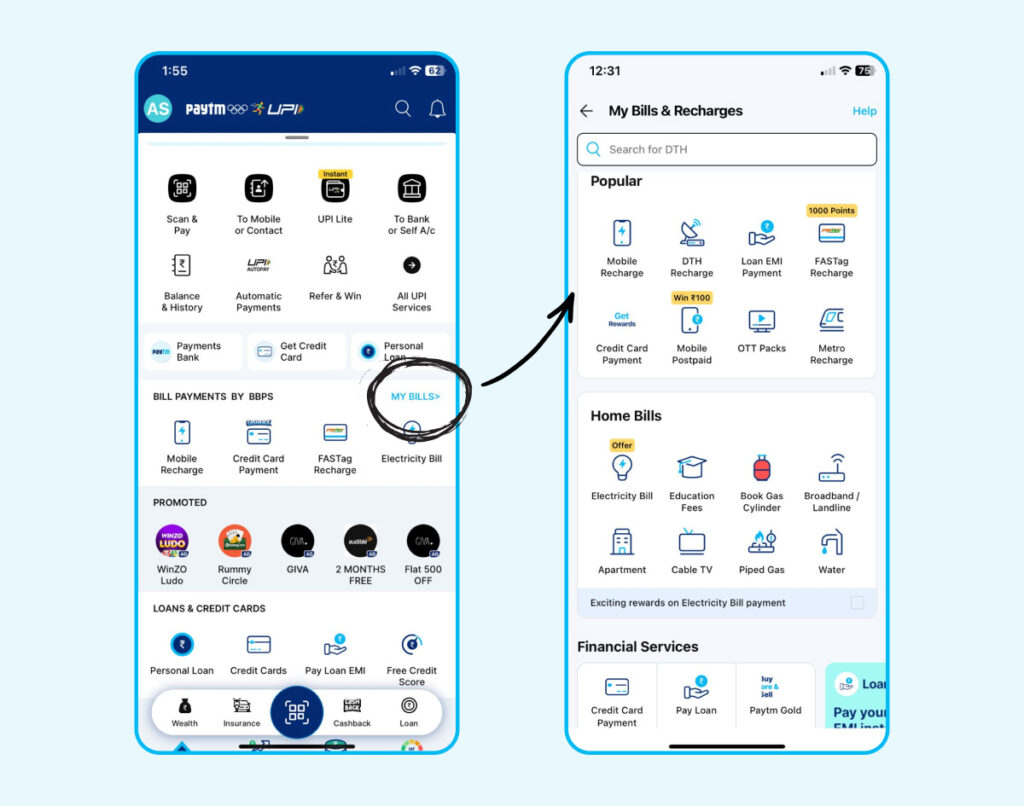
Step 4: Choose your service provider. Enter your phone number along with the STD code.
Step 5: Click on ‘Proceed’ to check the bill amount.
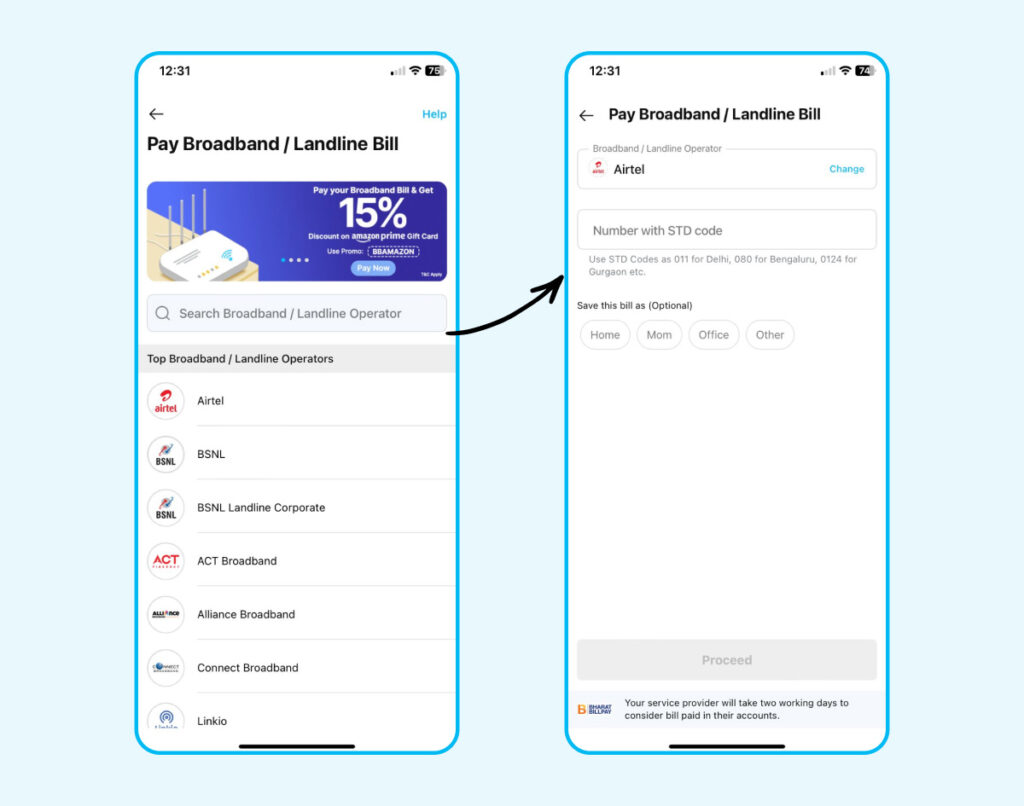
Step 6: Now, choose your preferred mode of payment to complete landline bill payment
On Paytm website
Step 1: Visit and login to the Paytm website
Step 2: Navigate to ‘Recharge & Pay Bills’ and click on ‘Pay broadband & Landline bill’ or Go to the Landline Payment Page on Paytm’s official website.
Step 3: Now, select your operator
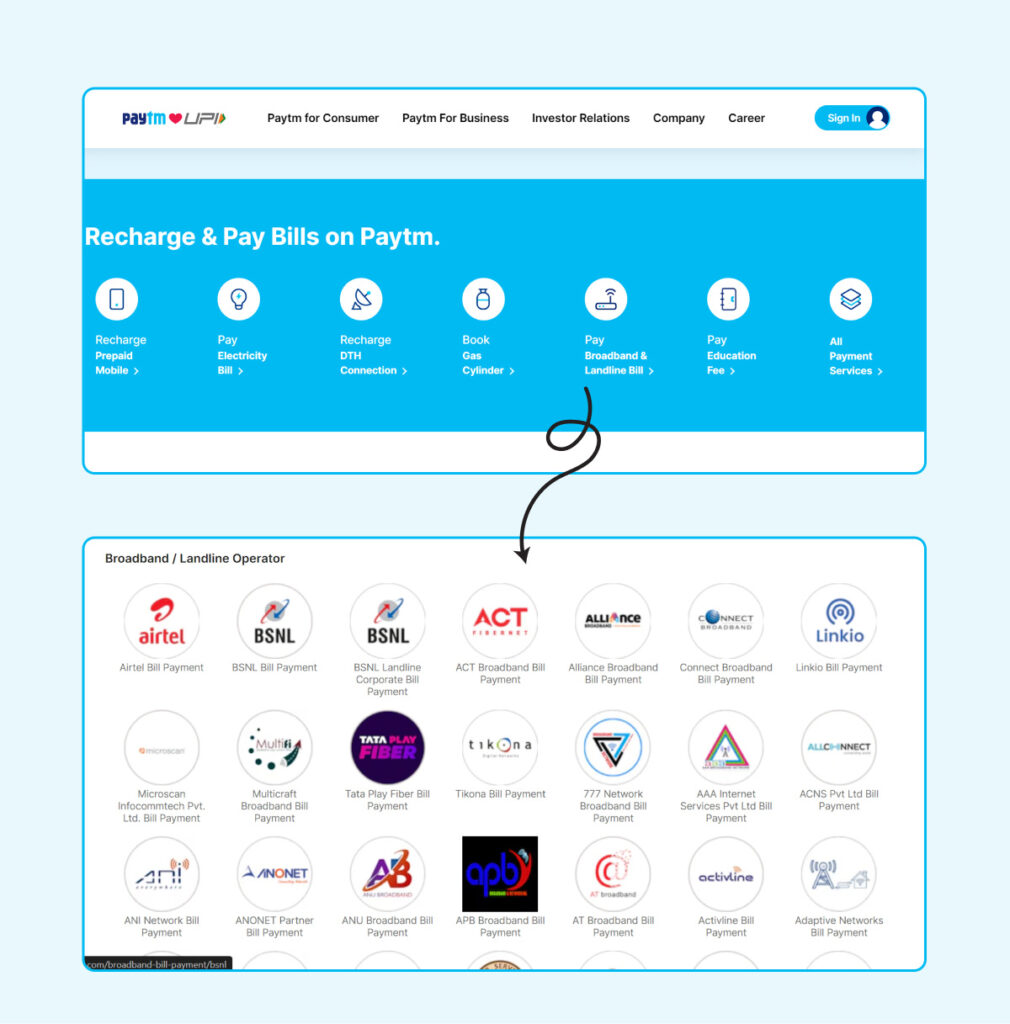
Step 4: Enter your landline number with STD code
Step 5: Choose your preferred mode of payment to complete landline bill payment.
Also Check: How to Reduce Landline Bills?
How To Pay Landline Bill Online on official website
Along with Paytm, you can also pay your landline bill online using the official website or app of the service provider.
Following are the steps to pay bill online using BSNL official website:
Step 1: Go to BSNL’s official website & Click on ‘My Account’.
Step 2: Click on ‘Sign in/Sign up’ (If you haven’t registered on the platform then sign up or else sign in)
Step 3: Use your credentials to sign in.
Step 4: Click on ‘Manage Accounts’ and then ‘Postpaid Accounts’
Step 5: Click on ‘New’ and submit your details such as account number, STD code etc.
Step 6: Click on ‘View Bills’ and then ‘Landline’
Step 7: Click on your ‘Landline Bill’, your bill will open in the PDF format
Step 8: Download your bill and you are done!
Benefits of Paying Landline Bills Online on Paytm
- Paytm sends timely reminders and notifications about upcoming due dates for your landline bills. This ensures that you never miss a payment and helps you avoid any late fees or service disruptions.
- Save money by cashback offers & amazing product deals for paying landline bills on Paytm.
- You have flexible payment methods on Paytm for your landline bill payments online.
- Paytm saves your details, so you don’t have to fill in the details again.
- In case of any queries, 24×7 support can help you instantly.
Disclaimer: This blog is written to make it easy for readers to understand complicated processes. Some information and screenshots may be outdated as government processes can change anytime without notification. However, we try our best to keep our blogs updated and relevant.

