


The UIDAI official website allows applicants to file a complaint regarding Aadhaar and to check its status. This blog will walk you through the steps to check the status of your Aadhaar complaint.
How to Check Aadhaar Complaint Status?
Following the submission of an Aadhaar complaint, users can check its status by following the steps outlined below:
- Go to the UIDAI’s official website
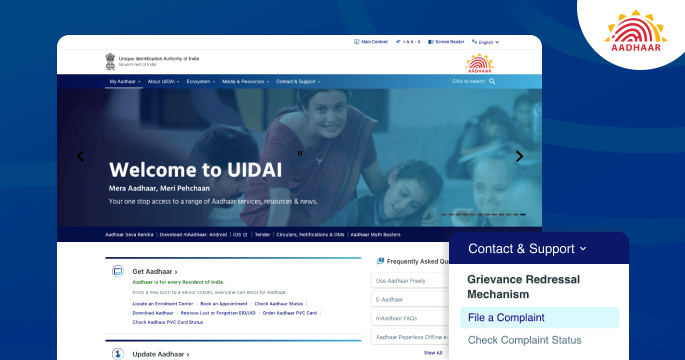
- Navigate to ‘Contact & Support’ and select ‘Check Complaint Status.’
- Enter the complaint ID and captcha code to check the complaint status.
How to File an Aadhaar Complaint?
The UIDAI has made it simple for users to file an Aadhaar complaint using the following methods:
File an Aadhaar Complaint through the UIDAI Contact Centre
The UIDAI contact centres are established to handle complaints, queries, and grievances related to Aadhaar enrolment, updation, and other services. Users who visit an official Aadhaar enrolment centre receive a printed acknowledgement slip containing their Enrolment Number (EID) during the Aadhaar enrolment process. Users can contact the UIDAI contact centre via the following channels by entering their EID number:
Toll-Free Number- 1947
Email ID- [email protected]
To file a complaint, users are required to follow the following instructions:
- Visit the official UIDAI website
- Navigate to ‘Contact & Support’ and click on ‘File a Complaint’
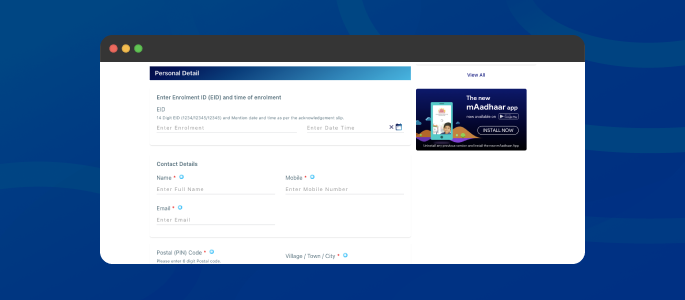
- Next, enter your Enrolment ID and personal details
- Select the complaint type and describe your concern.
- Enter the captcha code and submit the complaint.
Also Read: Prevent the Misuse of an Aadhaar Card
File an Aadhaar Complaint through Post
Users can file an Aadhaar complaint by sending a letter to any Regional Centre or the UIDAI headquarters.
Author

