

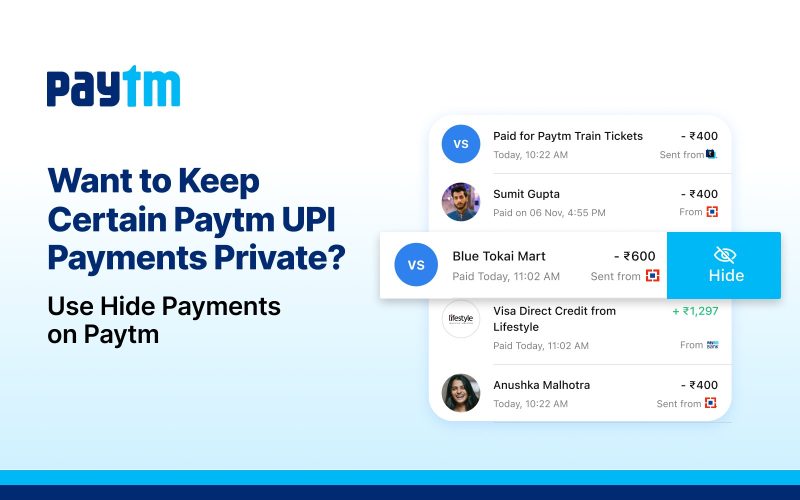
There are times when you don’t want every payment to be visible in your payment history. Maybe you’re planning a surprise gift for a loved one, paying for a personal subscription, or simply prefer to keep certain expenses private. While these Paytm UPI payments are important, you may not want them appearing every time you open your payment history.
That’s exactly why Hide Payments on Paytm is useful.
This feature lets you hide selected Paytm UPI payments from your payment history without deleting them. Your payment remains safe and accessible whenever you need it, but it stays out of your main history for added privacy and a cleaner view.
What is Hide Payments on Paytm?
Hide Payments is a privacy feature that allows you to hide specific Paytm UPI payments from your payment history. Instead of removing a payment permanently, it simply moves it out of your visible payment list.
This means you can organise your payment history while keeping certain payments private. Whether it’s a one-time payment or something personal, you stay in control of what appears in your history.
When Can Hide Payments Be Useful?
Here are a few everyday situations where the feature comes in handy.
You’re Planning a Surprise
Bought a birthday gift or booked tickets for someone special? Hiding those Paytm UPI payments helps keep the surprise intact if someone happens to use your phone.
You Share Your Phone
Many people occasionally hand their phones to family members or friends. If you’d rather keep certain payments private, Hide Payments gives you that extra layer of privacy.
You Want a Cleaner Payment History
Not every payment needs to stay front and centre. Hiding selected payments can make your history easier to browse, especially if you’re looking for recent everyday payments.
You Prefer More Privacy
Sometimes, you simply want to keep personal payments separate from the rest of your payment history. Hide Payments helps you do that in just a few taps.
How to Hide Payments on Paytm
Using the feature is quick and simple.
- Open the Paytm app.
- Go to Balance & History.
- Find the payment you want to hide.
- Swipe the payment to the left.
- Tap Hide Payment.
Once completed, the selected payment will no longer appear in your main payment history.
Enjoy More Privacy with Paytm
Your payment history is personal, and sometimes you may want a little more control over it. Whether you’re keeping a surprise under wraps, organising your payment history, or simply choosing more privacy, Paytm Hide Payments makes it easy.
With Paytm, managing Paytm UPI payments goes beyond making mobile payments. Features like Hide Payments help you stay organised while giving you greater control over your payment history, all within the Paytm app.
Author

