


One of the nodal agencies of the Government of West Bengal, West Bengal State Electricity Distribution Company Limited (WBSEDCL) plays a pivotal role in distributing electricity to homes, businesses, and industries, ensuring a consistent power supply throughout the state. Focused on being a leading power utility provider in India, WBSEDCL ensures that uninterrupted, high-quality power reaches all consumers across the state.
This guide covers WBSEDCL in detail, along with simple steps for online bill payment. To further simplify the process, Paytm provides a one-stop solution for paying your WBSEDCL electricity bill on its app in under a minute, simplifying the bill payment process, saving time, and enhancing the customer experience.
What is WBSEDCL?
WBSEDCL, short for West Bengal State Electricity Distribution Company Limited, is a government-designated agency whose primary functions include distributing electricity and generating hydroelectric power. It is responsible for distributing electricity to both urban and rural areas, ensuring reliable power supply to millions of consumers.
WBSEDCL manages the distribution network, handles billing, and works towards enhancing the efficiency and accessibility of electricity services across the state. Having demonstrated significant evolution in recent years, WBSEDCL is recognized as a leading provider of power utility services in the nation.
Steps to Pay WBSEDCL Bill Online on Official Website
Step 1: Go to https://www.wbsedcl.in.
Step 2: Click on “Consumer Corner“ > “Pay Online“ > “Online Payment“ or directly access the Online Payment section.
Step 3: Choose payment option
- Net-Banking: Utilize your bank’s net-banking facility for payment.
- Debit/Credit Card: Enter your card details securely for payment.
- Mobile Wallet: Pay using any BBPS-enabled Mobile Wallet or Banking App with your consumer ID.
- UPI: Use UPI for seamless payments.
- Bharat QR Code: Scan the Bharat QR code on your electricity bill using any Bharat QR-enabled mobile wallet or app, available 2 days after the billing date.
- RTGS/NEFT: Transfer funds via RTGS/NEFT to the exclusive account number provided by WBSEDCL, accessible 2 days after bill or quotation preparation.
Step 4: Enter the required details, verify the payment amount, and proceed to complete the transaction.
Step 5: Once the payment is successful, you will receive a confirmation message and a receipt for future reference.
Step-by-Step Guide to Pay WBSEDCL Bill on Paytm
Step 1: Log in to the Paytm app on your mobile device and navigate to the ‘Bill Payment by BBPS’ section.
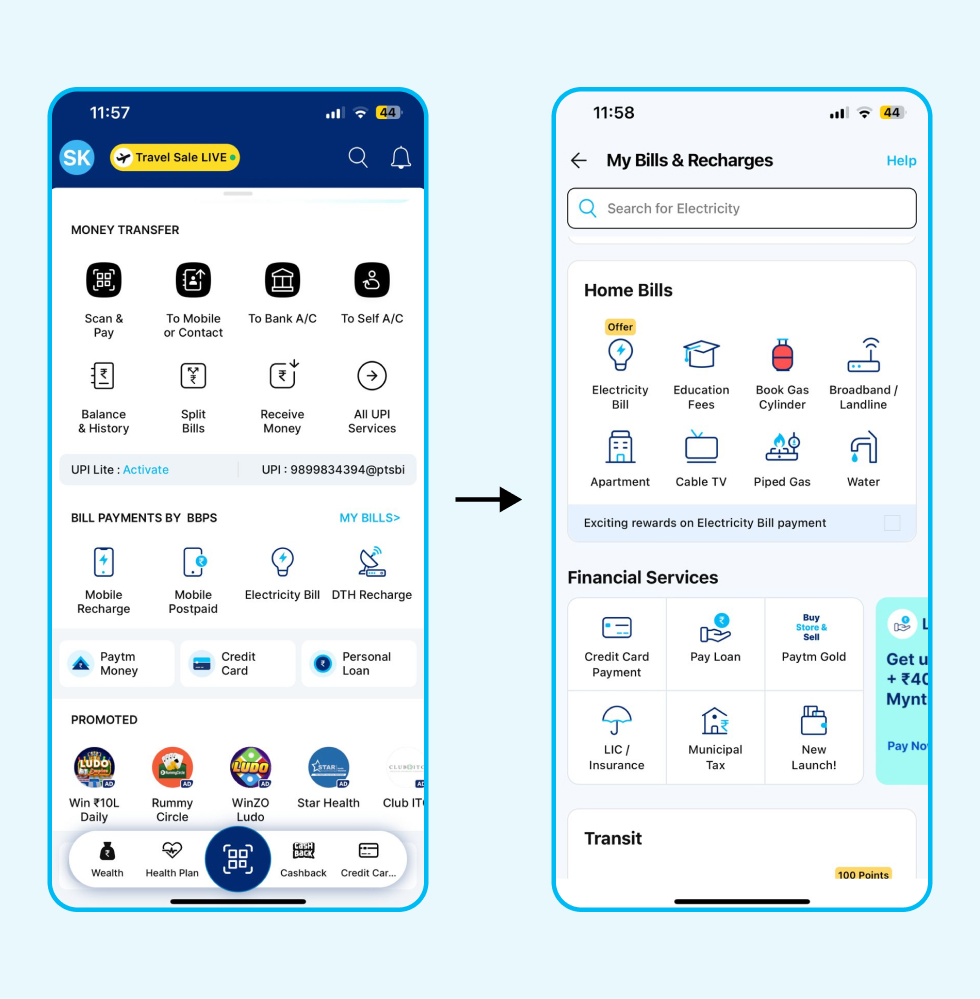
Step 2: Click on the ‘Electricity Bill’.
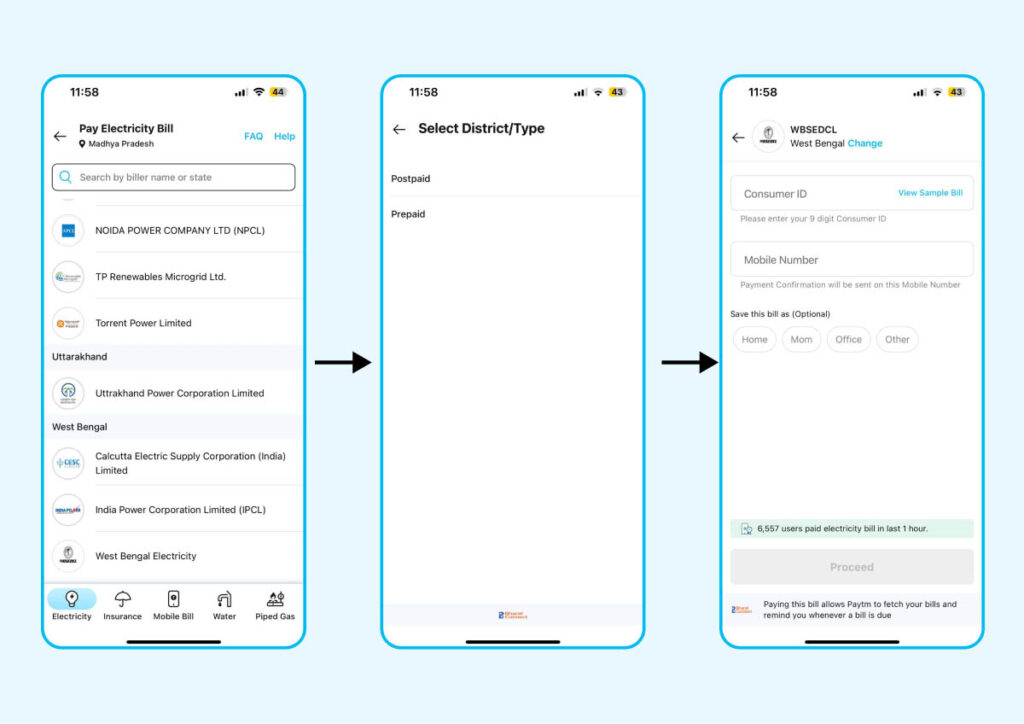
Step 3: Select ‘West Bengal Electricity’ as the state of the electricity board.
Step 4: Select your district and service type, such as ‘postpaid’ or ‘prepaid’
Step 5: Fill in all the required information, such as Consumer ID and mobile number.
Step 6: Tap on ‘Proceed’ to make the bill payment.
How to Download WBSEDCL Bill?
Step 1: Visit https://www.wbsedcl.in/irj/go/km/docs/internet/new_website/Home.html
Step 2: Click on the online payment button and select the e-payment option.
Step 3: Register your mobile number to access online value-added services. If already registered, proceed to the next step.
Step 4: Enter your username, password, and CAPTCHA text, then click the “Login“ button. From there, you can view your payment history and old bills, then download the bill.
What Are the Per-Unit Charges for WBSEDCL Electricity Bills and How to Calculate Your Bill?
| Number of Units | Cost per Unit |
|---|---|
| 1-102 | INR 5.30 |
| 103-180 | INR 5.97 |
| 181-300 | INR 6.97 |
| 301-600 | INR 7.31 |
| 601-900 | INR 7.58 |
| Above 900 | INR 8.99 |
To calculate your WBSEDCL electricity bill based on units consumed, you need to note the meter reading, which indicates the total units used. Then, you can reference WBSEDCL’s rate per unit to calculate your bill accordingly.
How to Register a Complaint for Wrong WBSEDCL Electricity Bill?
Step 1: Click on https://portal.wbsedcl.in/irj/go/km/docs/bills/IFRAME/ComplaintRegistrationWithoutLogin.html
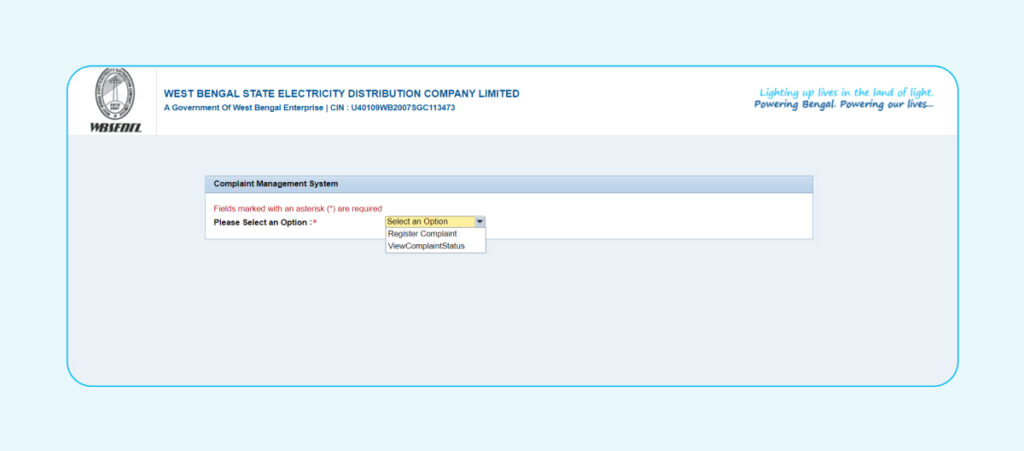
Step 2: From the dropdown menu, select the ‘Register Complaint’ option.
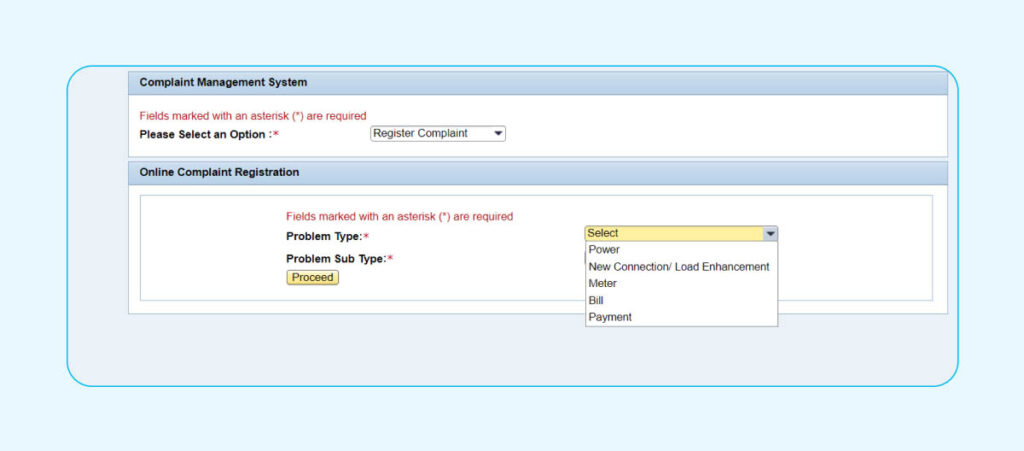
Step 3: Select your ‘Problem Type’ from the dropdown menu.
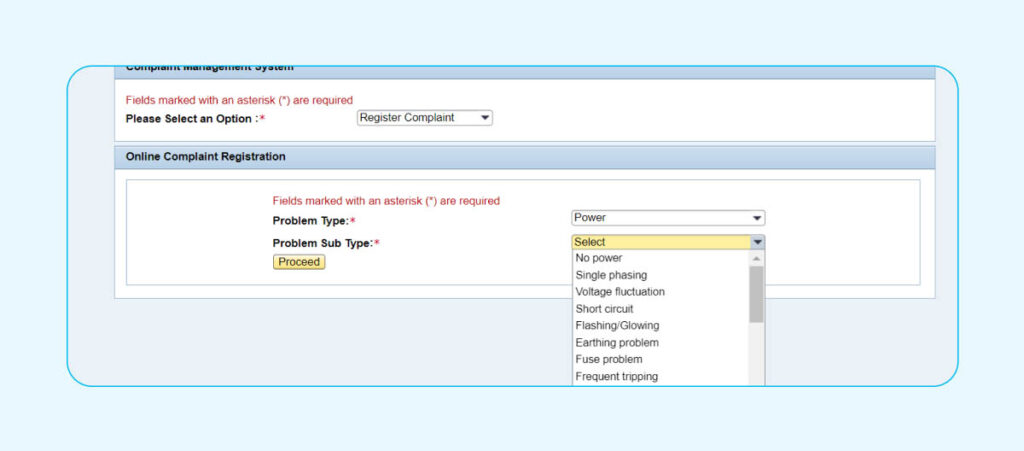
Step 4: Choose the relevant ‘Problem Sub Type’ from the dropdown menu and click ‘Proceed’.
Benefits of Paying WBSEDCL Bill Via Paytm
- Earn cashback points or amazing product deals when paying WBSEDCL bills on Paytm
- Paytm offers flexible payment methods for WBSEDCL bill payments online
- Receive timely reminders for your WBSEDCL bill payments to avoid missing due dates.
- Your bill details are automatically saved, simplifying future payments.
- Access instant help for any queries through Paytm’s 24×7 customer support service.
WBSEDCL Customer Care and Grievance Redressal
For assistance with WBSEDCL electricity bill payment inquiries, you can contact customer care service by dialing 1800-345-3201. Alternatively, you can send an SMS to 8422990336 from your registered mobile number to resolve any issues regarding your West Bengal electric bill or WBSEDCL bill payment.
Disclaimer: This blog is designed to simplify complex processes for readers. Please note that some information and screenshots may become outdated, as government processes can change without prior notification. However, we strive to keep our content updated and relevant.
What is the electricity cost of WBSEDCL per unit?
Author
