
- Recharge & Bills
- Ticket Booking
- Payments & Services
- Paytm for Business
- Company
 Download App
 Sign In
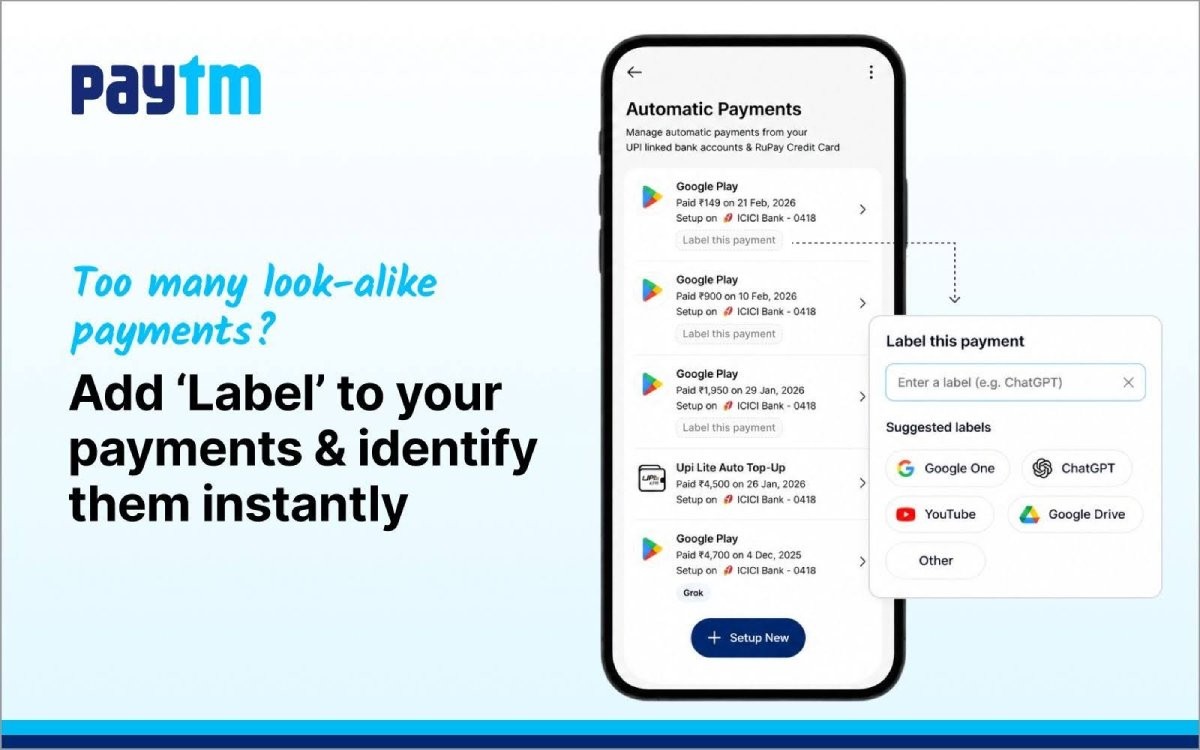
We have introduced Labels for Paytm UPI automatic payments, making it easier to identify and manage recurring payments on the Paytm app. With subscription-based services and recurring billing now part of everyday digital life, the addition is designed to bring clearer identification and stronger control to UPI payments that repeat each month.
As subscription services continue to grow, multiple Paytm UPI automatic payments are often linked to a single merchant for different services. Payments processed through aggregators such as app stores can group subscriptions for streaming, cloud storage, and other digital services under one merchant name, making individual recurring payments difficult to tell apart.
For example, an Android user paying for Google One, YouTube Premium and ChatGPT may see all three listed as subscription payments to a common merchant such as Play Store. This makes it hard to recall later why a particular amount is being deducted, especially for users running several subscriptions at once. Labels for Paytm UPI automatic payments are built to solve exactly this problem.
What are Labels for Paytm UPI Automatic Payments?
Labels allow a custom name to be added to each Paytm UPI automatic payment within the Automatic Payments section of the Paytm app. By tagging a recurring payment with its actual purpose, users can clearly see what each mandate is for, instead of relying on a generic merchant name. This gives every subscription payment a recognisable identity, turning a list of similar-looking deductions into payments that are easy to read at a glance.
Making Recurring Payments Easier to Identify
A custom label assigned to a recurring payment makes it simple to distinguish between multiple subscriptions billed under one name. Within the Automatic Payments section, each mandate now carries a clear purpose, so active UPI payments are easier to review. For users tracking where their money goes every month, this clarity removes the guesswork that often comes with recurring billing.
Better Control Across Multiple Subscriptions
Labels do more than aid identification. When several subscriptions are processed under one name, Labels help users correctly identify the active mandate linked to a specific service. This helps minimise the chances of cancelling an unintended recurring payment, a common risk when subscriptions look identical in a payment list. The result is greater control over which UPI payments stay active and which are stopped.
Built for the Growth of Subscription Payments
UPI automatic payments have become a convenient way to handle subscriptions, memberships and other regular dues without manual effort. As these subscription-based payments expand across entertainment, productivity and cloud services, organising and tracking them matters more than ever. Labels for Paytm UPI automatic payments bring that organisation directly into the Paytm app, helping users stay on top of their recurring commitments as the subscription economy continues to grow.
"Labels for Paytm UPI automatic payments enhance clarity and control by enabling easy identification of recurring payments. As subscription-based payments grow, this helps in managing multiple mandates more efficiently," said Paytm spokesperson.
How to Add a Label to Automatic Payments on Paytm
- Open the Automatic Payments section on the Paytm app
- Select the option to label the payment
- Choose a suggested label or enter a custom name
- Save the label to see it in the payment listing and details screen
As recurring payments become a preferred way to pay across subscription-based services, identifying and managing multiple mandates is increasingly important. With Labels for Paytm UPI automatic payments, every subscription gets a name a user actually recognises, making it far simpler to track active mandates and manage them with confidence on the Paytm app.
Frequently Asked Questions
What are Labels for Paytm UPI automatic payments?
Labels are custom names that can be added to each Paytm UPI automatic payment in the Automatic Payments section of the Paytm app. They identify the purpose of a recurring payment, making it easier to recognise and manage subscriptions linked to the same merchant.
Why do multiple subscriptions show up under the same merchant name?
Payments processed through aggregators such as app stores are often grouped under a single merchant name. For instance, services like Google One, YouTube Premium and ChatGPT may all appear as payments to a merchant such as Play Store, which makes individual subscriptions hard to tell apart without labels.
How do Labels help with subscription management?
By tagging each recurring payment with a clear purpose, Labels let users see at a glance what every mandate is for. This is especially useful when several UPI payments are deducted under the same merchant every month.
Can Labels help avoid cancelling the wrong recurring payment?
Yes. Because each mandate carries its own label, users can be sure which subscription they are stopping, reducing the chances of cancelling an unintended recurring payment when multiple subscriptions look similar.
Need Help? Get Your Issues Resolved Quickly
 Send a Query to Customer Care